Building a Production-Ready Multi-Account AWS Foundation
A practical blueprint for AWS account structure, network design, identity, CI/CD, and observability based on real enterprise and federal experience.
If you're running production workloads on AWS in a single account, you're carrying risk you don't need to. A multi-account foundation isn't just a "best practice" — it's the difference between an architecture that scales with your business and one that becomes a liability the moment something goes wrong.
This guide walks through the foundational decisions every team should make when building on AWS — based on patterns proven across enterprise retail, big tech, and federal government environments. By the end, you'll have a concrete blueprint for an account structure, network design, identity model, deployment pipeline, and observability strategy that scales.
Why Multi-Account?
The case for multiple AWS accounts comes down to four things:
- Blast radius isolation. A misconfiguration in development should never affect production.
- Hard security boundaries. IAM policies are powerful, but account boundaries are stronger.
- Cost attribution. Per-account billing makes it trivial to track spend by team, product, or environment.
- Compliance requirements. SOC 2, HIPAA, FedRAMP — all become simpler when scoped to specific accounts.
If you're going to use AWS at any meaningful scale, the question isn't whether to use multiple accounts — it's how to structure them.
The Foundational Account Structure
Start with AWS Organizations. The management account exists only to manage the organization — no workloads, ever. From there, you organize accounts into Organizational Units (OUs) based on function and risk profile.
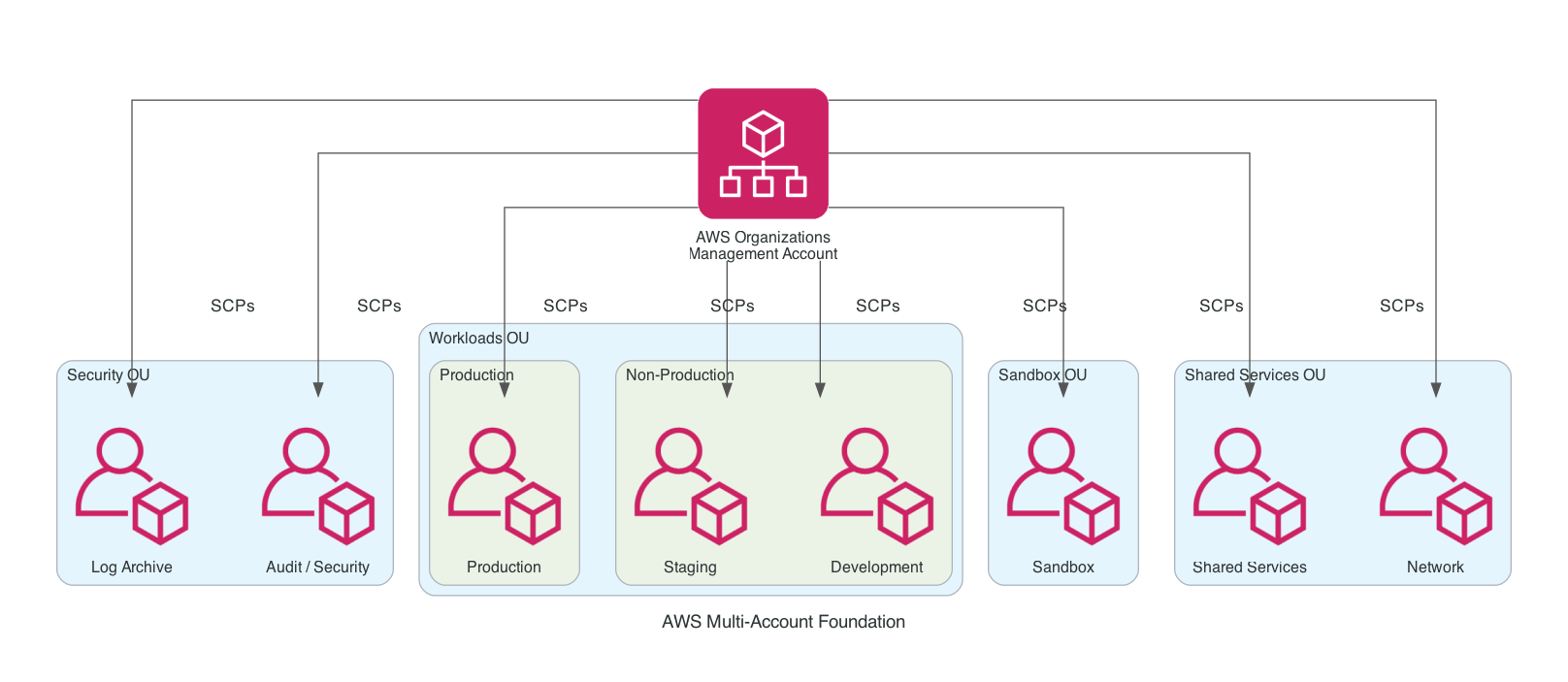
This is the structure we recommend for most organizations starting out:
- Security OU — Log Archive (immutable audit logs) and Audit (security tooling, GuardDuty findings, Security Hub)
- Workloads OU — Production, Staging, Development. Each environment gets its own account.
- Shared Services OU — Network (Transit Gateway, DNS) and Shared Services (CI/CD, container registries, monitoring)
- Sandbox OU — Isolated experimentation accounts with strict spend limits
Apply Service Control Policies (SCPs) at the OU level to enforce guardrails — things like "no one can delete CloudTrail" or "production accounts cannot be modified outside approved regions."
A common mistake: putting all environments in a single account and using IAM policies to separate them. This works until it doesn't — and when it doesn't, the blast radius is your entire AWS footprint.
Network Architecture: Hub and Spoke
Once you have multiple accounts, you need a network strategy. The hub-and-spoke model with AWS Transit Gateway is the cleanest approach:
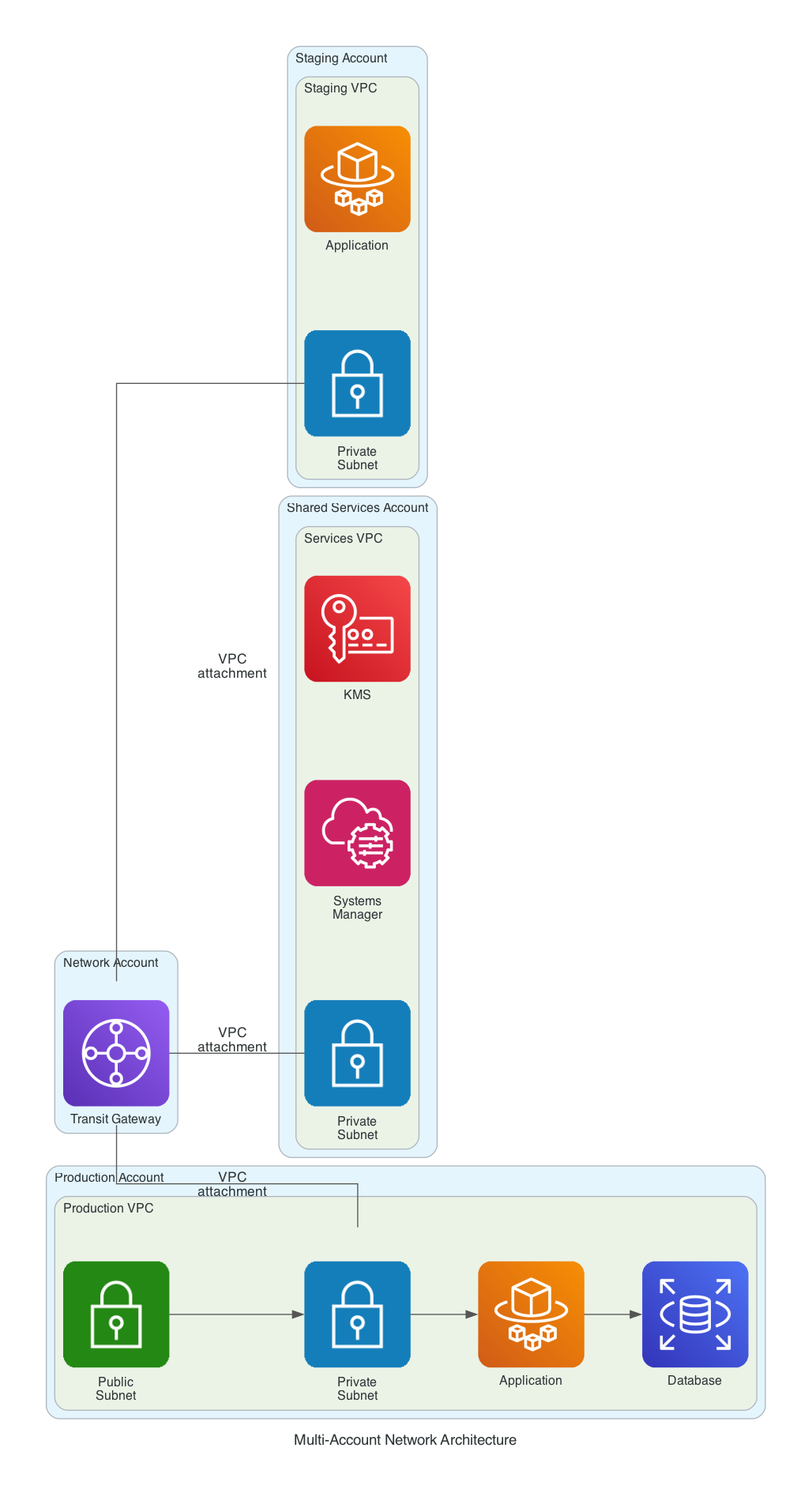
Key design principles:
- One VPC per account. Don't try to share VPCs across accounts. Use Transit Gateway for inter-account communication.
- Centralized egress (optional). Route all internet traffic through a shared NAT Gateway in the network account for cost efficiency at scale.
- VPC endpoints for AWS services. Keep traffic to S3, DynamoDB, KMS off the public internet.
- Non-overlapping CIDR blocks. Plan your IP space upfront. We typically use a
10.0.0.0/8with each account allocated a/16.
CIDR Allocation Pattern
Here's a CIDR allocation pattern that scales:
| Account | CIDR Block | Available IPs |
|---|---|---|
| Production | 10.0.0.0/16 | ~65,000 |
| Staging | 10.1.0.0/16 | ~65,000 |
| Development | 10.2.0.0/16 | ~65,000 |
| Shared Services | 10.10.0.0/16 | ~65,000 |
| Sandbox | 10.99.0.0/16 | ~65,000 |
Identity: Centralized SSO
Don't create IAM users in each account. That path leads to credential sprawl, weak passwords, and access reviews that take weeks. Use AWS IAM Identity Center (formerly AWS SSO) for centralized identity:
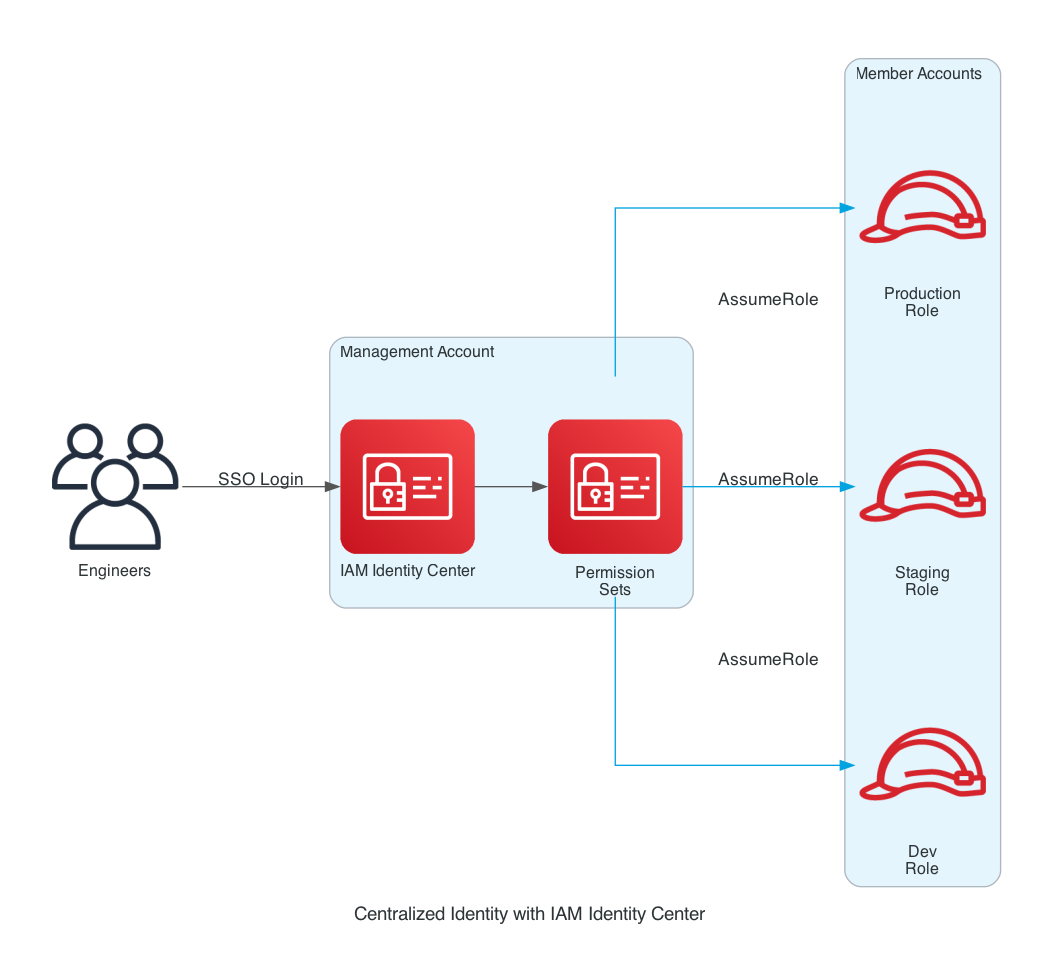
The model works like this:
- Users authenticate against IAM Identity Center (often federated with your IdP — Okta, Azure AD, Google Workspace)
- Permission Sets define what a user can do (e.g.,
ReadOnly,DeveloperAccess,AdminAccess) - Users are assigned permission sets for specific accounts
- Access is via short-lived credentials — no long-lived keys
Common permission sets to define:
{
  "PermissionSets": [
    {
      "Name": "ReadOnly",
      "Policies": ["arn:aws:iam::aws:policy/ReadOnlyAccess"],
      "SessionDuration": "PT4H"
    },
    {
      "Name": "DeveloperAccess",
      "Policies": ["arn:aws:iam::aws:policy/PowerUserAccess"],
      "SessionDuration": "PT4H"
    },
    {
      "Name": "AdminAccess",
      "Policies": ["arn:aws:iam::aws:policy/AdministratorAccess"],
      "SessionDuration": "PT1H"
    }
  ]
}
Use AdminAccess sparingly. For day-to-day work, DeveloperAccess is sufficient. Reserve admin for breakglass scenarios.
CI/CD: Cross-Account Deployments
Your pipeline lives in the Shared Services account. From there, it deploys into the workload accounts using cross-account IAM roles:
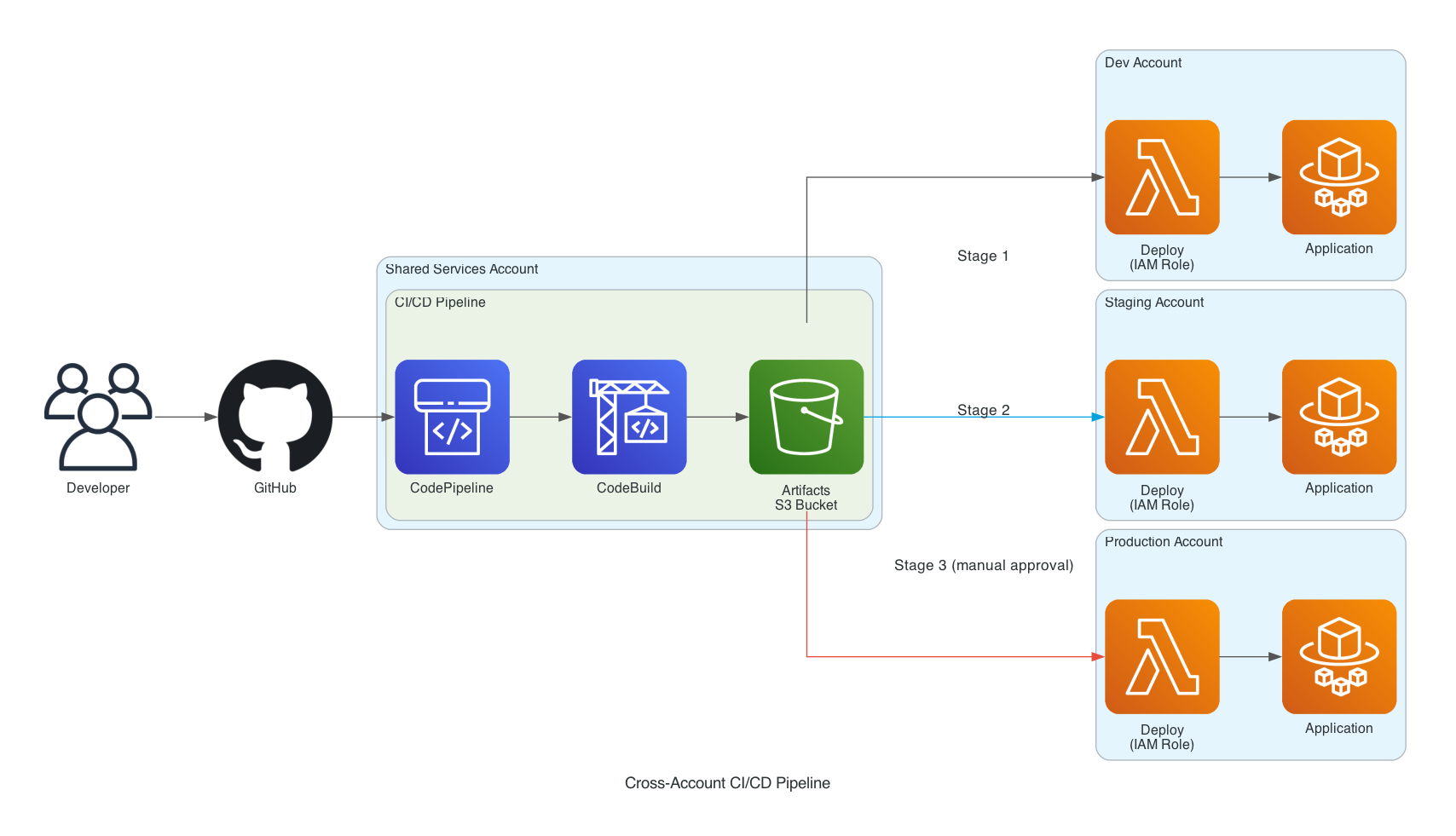
Each workload account has a deployment role that trusts the Shared Services account:
{
  "Version": "2012-10-17",
  "Statement": [
    {
      "Effect": "Allow",
      "Principal": {
        "AWS": "arn:aws:iam::SHARED-SERVICES-ACCOUNT-ID:role/PipelineExecutionRole"
      },
      "Action": "sts:AssumeRole",
      "Condition": {
        "StringEquals": {
          "sts:ExternalId": "wingu-deployment-2026"
        }
      }
    }
  ]
}
Key practices:
- Same pipeline, different accounts. Use the same deployment automation across dev, staging, and prod. Differences should be config, not code.
- Manual approval before production. Even with full automation, a human approval step before prod catches things automation misses.
- Artifact promotion, not rebuilds. Build once in dev, promote the exact same artifact through staging to production.
- Separate KMS keys per environment. Encrypted artifacts shouldn't be decryptable across environment boundaries.
Security & Observability
The final piece is centralized security and observability. Every account streams logs and findings to dedicated security accounts:
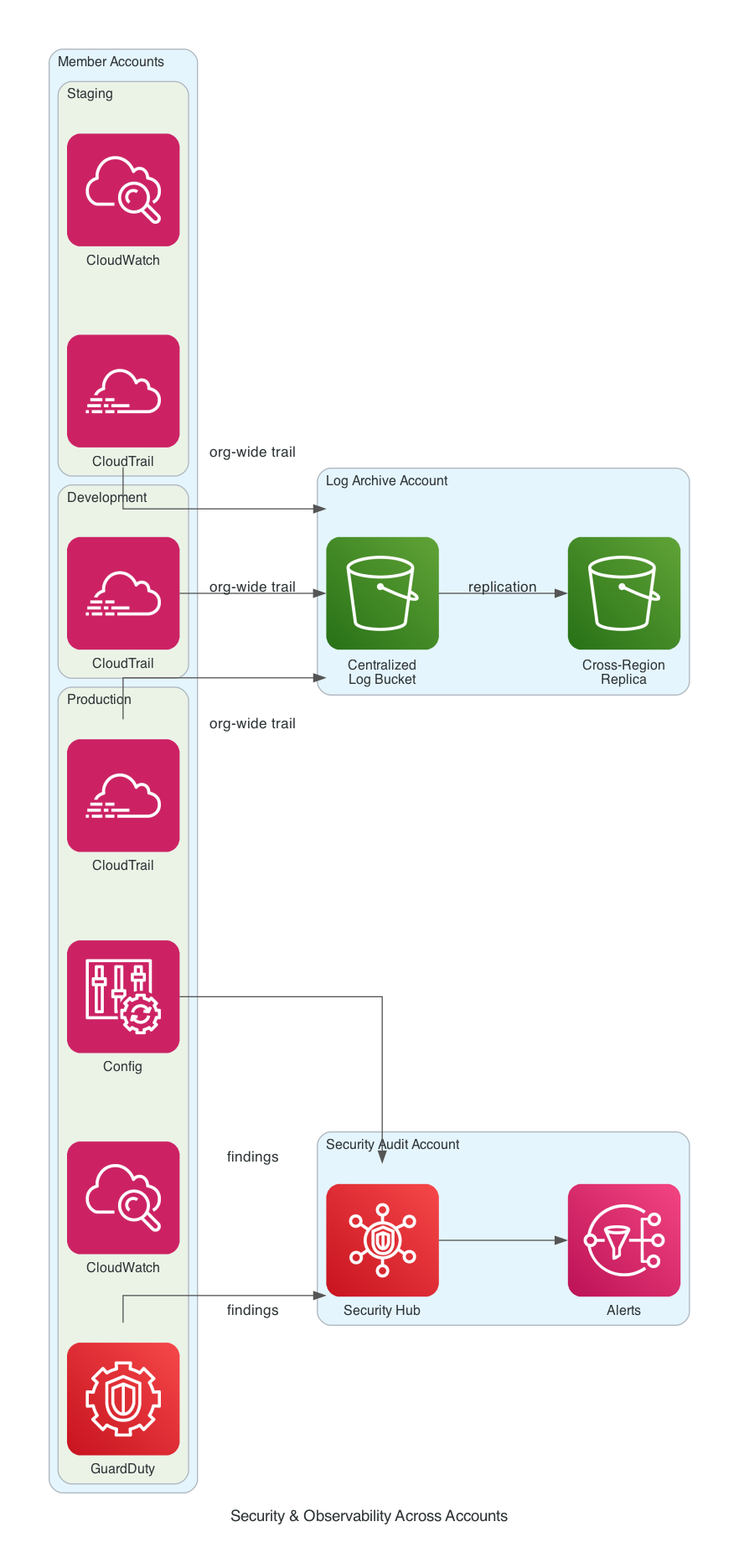
What to enable from day one:
- Organization-wide CloudTrail with logs delivered to the Log Archive account, S3 Object Lock enabled for tamper-resistance
- AWS Config in every account, recording all resource changes
- GuardDuty for threat detection, with findings aggregated in the Audit account
- Security Hub as a single pane of glass for compliance status
- Cross-region replication for the log archive bucket — protect against regional outages
The Log Archive Account is Sacred
The Log Archive account should have the most restrictive controls in your entire organization:
- SCP that prevents log deletion, even by root
- S3 Object Lock with compliance mode
- No interactive access except for emergency response
- Cross-region replication enabled
- Dedicated KMS keys with strict access policies
If your security team can't trust the logs, every incident response becomes guesswork.
Implementation Roadmap
Don't try to build all of this at once. Here's a practical order of operations:
| Phase | Duration | Deliverables |
|---|---|---|
| Phase 1: Foundation | 2-3 weeks | Organizations, OUs, baseline accounts (Security, Production, Dev) |
| Phase 2: Identity | 1-2 weeks | IAM Identity Center, permission sets, federated SSO |
| Phase 3: Network | 2-3 weeks | Transit Gateway, VPCs in each account, CIDR allocation |
| Phase 4: Observability | 1-2 weeks | Org-wide CloudTrail, Config, GuardDuty, Security Hub |
| Phase 5: CI/CD | 2-4 weeks | Cross-account pipeline, deployment roles, artifact promotion |
Total: 8-14 weeks for a solid foundation. Faster if you have an experienced team. Some teams do this in days using AWS Control Tower as a starting point — though we generally recommend customizing rather than relying entirely on it.
Common Pitfalls
Things we've seen teams get wrong, and how to avoid them:
Pitfall #1: Over-engineering early
Start with the minimum viable structure: one prod, one non-prod, one security/log archive. Add OUs and accounts as you have actual workloads requiring them.
Pitfall #2: Skipping SCPs
"We'll add guardrails later." No, you won't. Add SCPs at the OU level from day one — even simple ones like "no public S3 buckets" and "deny resource creation outside us-east-1."
Pitfall #3: Manual setup
If your account structure isn't reproducible via code (Terraform, CDK, CloudFormation), it's a one-shot artifact that will drift over time. Treat your foundation as code.
Pitfall #4: Ignoring the management account
The management account is your most privileged account. It needs the strongest MFA, the most restrictive access, and zero workloads. Treat it like the master key.
Cost Considerations
Multi-account architectures don't cost much in absolute terms, but the components add up:
| Service | Approximate Monthly Cost |
|---|---|
| AWS Organizations | Free |
| IAM Identity Center | Free |
| Transit Gateway | ~$36/month per attachment + data transfer |
| CloudTrail (org-wide) | ~$2/100K events |
| GuardDuty | ~$1-5 per account |
| Security Hub | ~$0.10 per check + small data charges |
| AWS Config | ~$0.003 per recording |
For most small-to-medium organizations, expect the foundational layer to add $200-500/month before any workloads. Worth every dollar for the security posture.
Final Thoughts
A multi-account AWS foundation isn't a one-time project — it's the bedrock everything else builds on. Get it right, and your team can move faster with confidence. Get it wrong, and you'll spend years working around the limitations.
The good news: the patterns are well-established. The hard part is execution — making the dozens of small decisions that compound into either a clean foundation or a future migration project.
If you're standing up a new AWS environment or modernizing an existing one, this is the kind of work where experience pays for itself many times over. We've helped teams across enterprise retail, federal healthcare, and high-growth startups build foundations like this — happy to talk through your specific situation.
Wingu Systems is a cloud and technology consulting firm based in Dallas, TX. We help businesses build production-ready AWS infrastructure with the same rigor used at Fortune 500 retail, big tech, and federal agencies.